I do not trust an automation that never asks for help.
That usually means one of two things.
Either the workflow only handles the easiest cases, or it quietly guesses when the data does not fit. The first saves less time than expected. The second is how the wrong follow-up reaches the wrong person with impressive efficiency.
Human-in-the-loop sales automation works by separating routine decisions from uncertain ones. Clean records continue automatically. Ambiguous, incomplete, or high-risk records enter a small exception queue with enough context, one owner, and a review deadline before anything customer-facing happens.
That is the short answer.
The difficult part is not adding an approval button. It is designing what deserves review, who reviews it, and what the system learns from the decision.

The happy path is not the real workflow
Automation diagrams are naturally optimistic.
A lead arrives. The company is enriched. The CRM record is created. An owner is assigned. A follow-up is drafted. Everyone nods at the arrows.
Then reality contributes a record with two possible companies, a missing country, an old contact owner, and meeting notes that say “follow up later” without explaining whether later means Friday or next quarter.
That record is not rare noise. It is part of the process.
In an 11–50 person team, the strange cases often matter more than their volume suggests. They can include a founder’s referral, an existing customer asking about another service, a strategic account, or someone who has already spoken to two colleagues. A workflow can process ninety routine records correctly and still create a commercial mess with the tenth one.
This is why reliability is not the same as “the workflow ran successfully.”
The system also needs to know when it should stop.
Human review needs a destination
“A human checks it” sounds reassuring. It is also incomplete.
Where does the case go?
Who sees it?
How soon?
What information do they receive?
What happens after they decide?
If those questions have no operational answer, human review is not a control. It is a polite hope.
An exception queue gives uncertain cases a visible destination. It can live in the CRM, a task view, or a tightly connected operations queue. The tool matters less than the behaviour: the case is parked safely, assigned, explained, and resolved without disappearing into a private inbox.
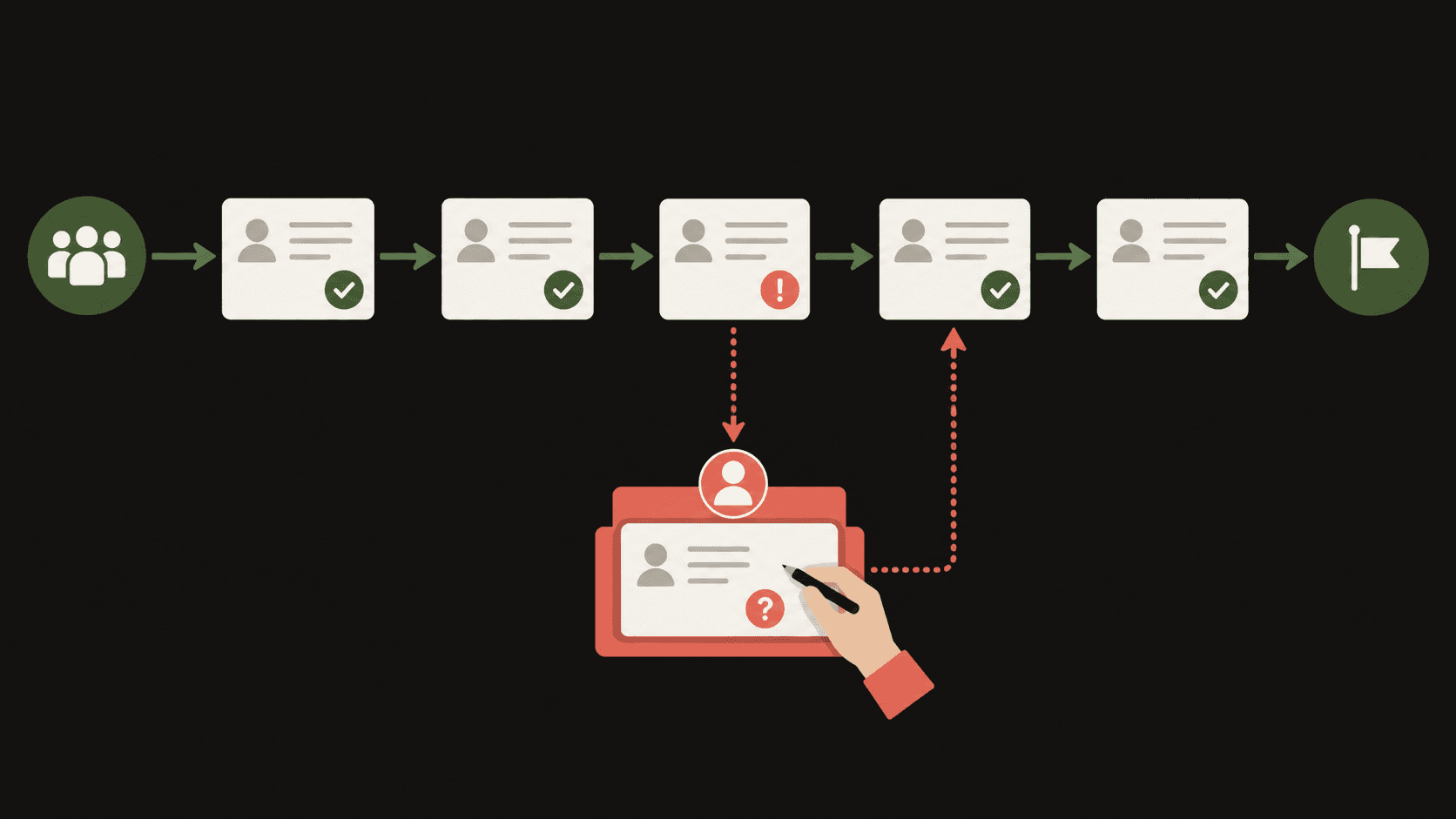
What should enter the exception queue?
Not every action needs approval. If people must click through every clean record, the automation has recreated manual work with better branding.
The queue should catch uncertainty or risk that changes the outcome. For example:
These are not all the same kind of exception.
Some are data problems. Some are commercial decisions. Some are integration failures. Mixing them into one undifferentiated pile makes the queue harder to work and harder to improve.
Start with three practical categories:
That is usually enough structure for a small team. You do not need a miniature air-traffic control centre for twelve cases a week.
Give the reviewer the whole decision, not a mystery task
A task called “check CRM” is not an exception-handling system.
The reviewer should see the information needed to decide without opening five tabs and reconstructing the workflow. A useful exception item includes:
The review choices should also be concrete. “Approve” and “reject” may be enough for a drafted email. A duplicate-company case might need “merge later,” “link to existing company,” or “create as separate company.”
Good options reduce interpretation. They also make the eventual outcome useful data.
The owner matters more than the notification
It is easy to add notifications. It is much harder to create ownership.
Sending an alert to a channel does not mean anyone owns the case. Neither does assigning every exception to “Sales Ops” when Sales Ops is one person wearing three other hats.
Use one named owner for each exception type.
The sales owner can review relationship-sensitive follow-ups. The operations owner can handle routing and duplicate decisions. A system owner can handle technical failures and retries. If a decision needs two people, one person should still own getting the answer.
Then add a review target that matches the risk:
Without a deadline, exception queues become small museums of unresolved edge cases.
Record the outcome so the workflow can improve
The reviewer’s decision should not vanish after the case is closed.
Capture the resolution and, where useful, the reason. After a few weeks, patterns appear.
Perhaps one form field creates most routing exceptions. Perhaps company domains are missing for one lead source. Perhaps the “existing customer” rule is too cautious. Perhaps a workflow fails whenever a CRM owner has left the company.
Those patterns tell you what to fix next.
Some fixes belong in CRM validation. Some belong in the form. Some belong in the orchestration logic. Some should remain human decisions because the commercial context genuinely varies.
This is the useful version of AI learning in sales operations: not a vague promise that the system becomes clever on its own, but a review trail that helps a person improve the rules deliberately.
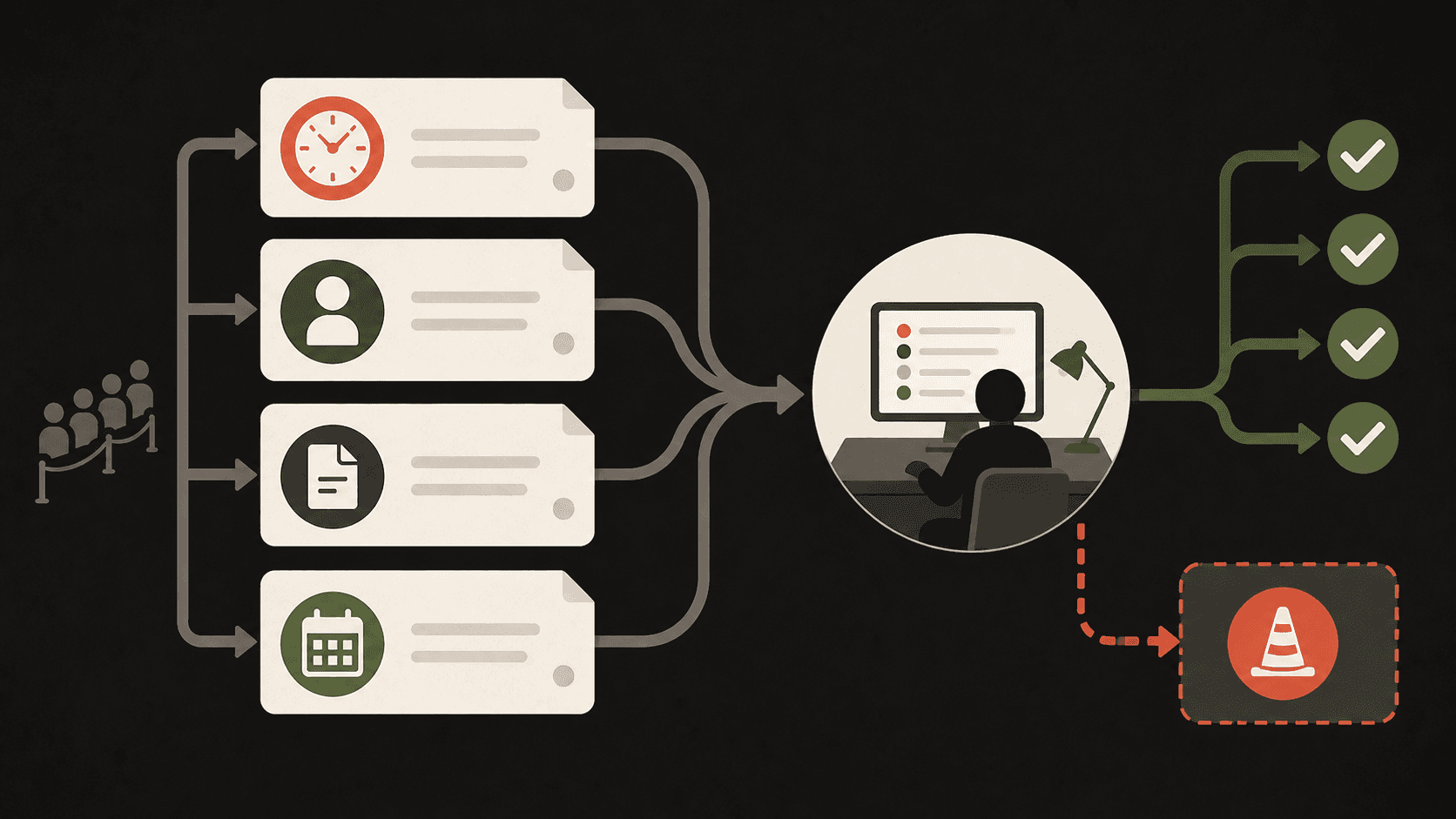
A simple exception-queue design for a small team
You can sketch the first version in thirty minutes.
Choose one existing sales workflow, such as meeting notes to CRM update and follow-up draft. Then write down:
Build the smallest version that makes uncertain work visible.
If the queue receives almost everything, your happy-path rules are too strict or your source data is poor. If it receives nothing, test the workflow with deliberately incomplete and contradictory records. Perfect silence is rarely proof of perfect design.
Inspect the weird cases before adding more automation
Automation adoption is not only about making the easy work faster.
People also need to trust what happens when the system is unsure. A visible exception queue gives the team that trust because it makes uncertainty manageable instead of pretending it does not exist.
Pick one workflow this week and look for the point where it currently guesses, fails silently, or sends someone a vague “please check” message.
That point is probably where your exception queue should begin.
If you want a second pair of eyes, Promptfields can review your CRM, follow-up process, and automation stack with you—and identify which decisions should run automatically, which should stop, and what your team needs to review.