I have an embarrassing weakness for a tidy training deck.
Clear screenshots. Sensible arrows. A final “Any questions?” as if that settles the matter.
Then Monday arrives.
Someone keeps notes in their inbox. Someone updates five deals at once on Friday afternoon. Someone creates a private spreadsheet because the CRM takes too long.
The short answer: low CRM adoption is usually a workflow problem, not a training problem. People use a CRM when it helps them make the next sales decision, asks for only the information needed at that moment, and removes repetitive work. Training matters, but it cannot rescue a system that adds effort without giving anything useful back.

For an 11–50 person team, the practical strategy is to simplify the workflow, automate preparation, keep judgment human, and review where people leave the system.
People are not resisting the CRM. They are protecting their working day.
When a salesperson avoids the CRM, the easy explanation is discipline.
Sometimes that is true. Usually it is incomplete.
Imagine a rep finishing a good discovery call. They need to send a follow-up, confirm the next meeting, check one technical question, and brief a colleague. The CRM asks them to choose from fourteen fields, remember which stage means what, write a summary, and set three dates.
Their inbox asks them to press Reply.
The inbox wins.
The CRM is competing with the real workflow and losing.
Good CRM adoption starts by asking a less accusatory question: what useful job does the record do for the person updating it?
If the answer is only “management needs the report,” usage will always be fragile. The CRM should also help the rep remember the next action, prepare the follow-up, or find the latest context.
Start with the decision, not the field
Most CRM clean-ups begin with fields.
I would begin with decisions.
For each important point in the sales process, ask:
For example, moving a deal from discovery to proposal is not a data-entry event. It is a decision that the problem, buyer, timing, and next step are clear enough to justify proposal work.
The CRM should collect the evidence for that decision. It should not collect every fact that might someday be interesting.
This is where implementations become heavy. A field is added for every request and reporting idea. Together they turn a two-minute update into administrative archaeology.
If nobody can explain which decision a required field supports, it probably should not be required.
Define the minimum useful record
A minimum useful deal record is not an empty record. It contains the small set of facts that keeps work moving.
For many growing teams, that means:
Other fields can appear when the process needs them. Handoff details matter before onboarding. Loss reason matters when a deal closes.
They do not all need to confront the user after the first conversation.
This is progressive disclosure in plain English: ask for information when it becomes useful.
A smaller number of meaningful fields is also easier to maintain than a large form filled with guesses.
Read: AI Will Not Fix Your CRM Data on Its Own →
Let automation prepare the update
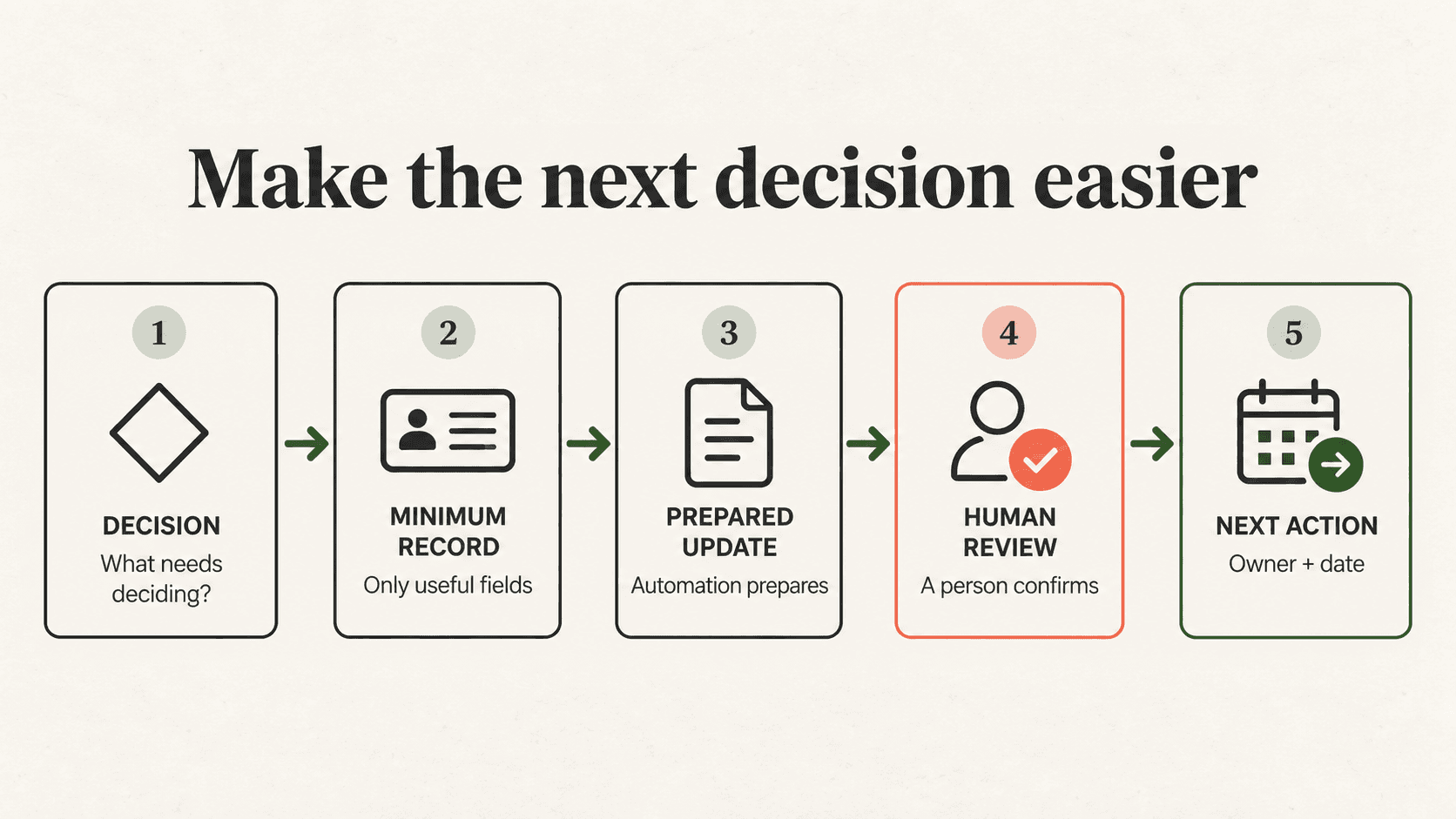
AI can remove a useful amount of CRM friction, but only if its role is clear.
After a meeting, it can prepare a summary, identify commitments, suggest a next action, and draft the follow-up. An integration can attach the meeting, match the contact, and bring the relevant deal into view.
The rep should then review the prepared update and correct it before approval.
That distinction matters.
The goal is not to make people responsible for nothing. The goal is to stop wasting their attention on copying facts between systems.
Automation should prepare the record. The human should confirm the meaning.
The same principle applies to lead routing, stale-deal prompts, handoffs, and data enrichment. Automate predictable movement. Keep customer-facing wording, ambiguous matches, and important stage changes reviewable.
A workflow that occasionally asks for a sensible decision is easier to trust than one that silently makes ten decisions nobody can inspect.
Make missing updates visible and owned
CRM adoption does not improve because everyone promises to “keep it updated.”
It improves when the operating rules are visible.
A simple weekly view can show:
The list needs an owner and a rhythm. Ten minutes in the Monday pipeline review can be enough if the team deals with exceptions instead of rereading every record.
This turns adoption from a vague expectation into a small operational loop: notice, decide, correct, improve.
If the team updates the CRM but meetings still run from private spreadsheets, the organisation is teaching people that the CRM is optional.
Use the system in the real decision meeting, or do not be surprised when the team stops feeding it.
Train the exceptions, not every click
Training still matters. It is just often aimed at the wrong thing.
People rarely need another tour of the navigation. They need to know what “qualified” means, when a deal should leave the pipeline, what to do when two companies look like duplicates, and who reviews an uncertain automation result.
Those are operating questions.
A useful CRM training session should therefore work through real scenarios:
If the team can resolve those cases consistently, the buttons are the easy part.
See how Promptfields approaches CRM implementation →
A 30-minute CRM adoption test
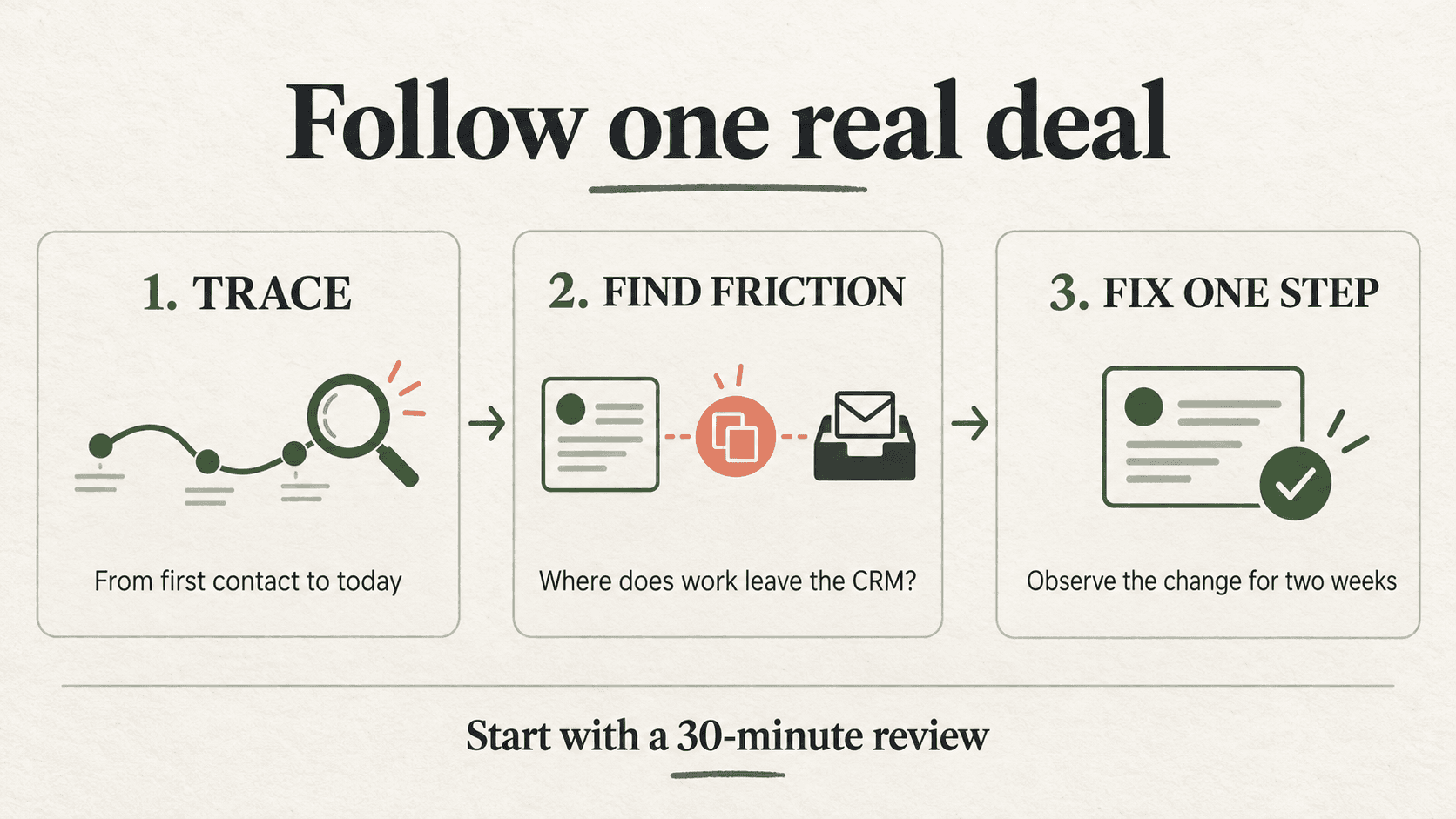
You do not need a company-wide survey to find the first problems.
Take one recent deal and trace it from first contact to its current stage. Sit with the person who handled it and observe the real process.
For each step, ask:
Then fix the worst point of friction first.
Do not redesign the entire CRM because one step is clumsy. Remove one unnecessary requirement, make one definition clearer, or prepare one repetitive update automatically. Watch what changes for two weeks.
Useful adoption measures are behavioural, not theatrical:
Logins are easy to count. They are not proof that the system is helping.
The CRM should earn its place in the workflow
Your team does not wake up wanting to use a CRM.
They want to remember what matters, follow up properly, make good decisions, and avoid unpleasant surprises in the pipeline meeting.
The CRM earns adoption when it makes those jobs easier.
That usually means fewer required fields, clearer operating rules, prepared updates, visible exceptions, and managers who use the same system they ask everyone else to maintain.
If adoption is low, resist the urge to schedule training first. Follow one real deal through the process. Find the moment where the CRM asks for effort and gives nothing back.
That moment is probably your first fix.
If you want a second pair of eyes, Promptfields can review the workflow around your CRM—not just the configuration—and identify where follow-up, ownership, or manual work is pushing people out of the system.